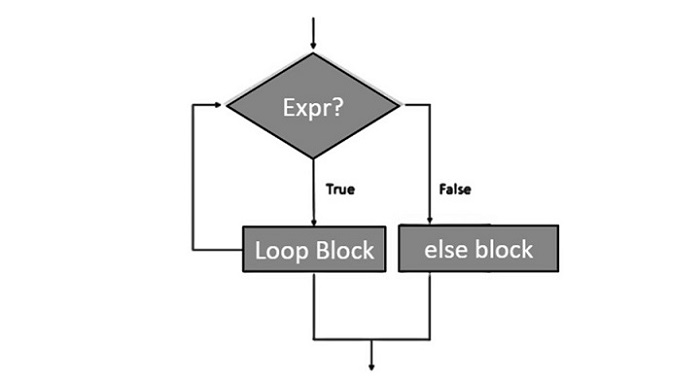
Python supports having an "else" statement associated with a "for" loop statement. If the "else" statement is used with a "for" loop, the "else" statement is executed when the sequence is exhausted before the control shifts to the main line of execution.
The following flow diagram illustrates how to use else statement with for loop −
Example
The following example illustrates the combination of an else statement with a for statement. Till the count is less than 5, the iteration count is printed. As it becomes 5, the print statement in else block is executed, before the control is passed to the next statement in the main program.
On executing, this code will produce the following output −
Iteration no. 1
Iteration no. 2
Iteration no. 3
Iteration no. 4
Iteration no. 5
for loop over. Now in else block
End of for loop
Nested Loops
Python programming language allows the use of one loop inside another loop. The following section shows a few examples to illustrate the concept.
Syntax
The syntax for a nested while loop statement in Python programming language is as follows −
A final note on loop nesting is that you can put any type of loop inside any other type of loop. For example a for loop can be inside a while loop or vice versa.
Example
The following program uses a nested-for loop to display multiplication tables from 1-10.
The print() function inner loop has end=' ' which appends a space instead of default newline. Hence, the numbers will appear in one row.
The last print() will be executed at the end of inner for loop.
When the above code is executed, it produces the following output −
  1   2   3   4   5   6   7   8   9  10
  2   4   6   8  10  12  14  16  18  20
  3   6   9  12  15  18  21  24  27  30
  4   8  12  16  20  24  28  32  36  40
  5  10  15  20  25  30  35  40  45  50
  6  12  18  24  30  36  42  48  54  60
  7  14  21  28  35  42  49  56  63  70
  8  16  24  32  40  48  56  64  72  80
  9  18  27  36  45  54  63  72  81  90
 10  20  30  40  50  60  70  80  90 100


The End! should you have any inquiries, we encourage you to reach out to the Vercaa Support Center without hesitation.
