Python’s decision making functionality is in its keywords – if, else and elif. The if keyword requires a boolean expression, followed by colon symbol.
The colon (:) symbol starts an indented block. The statements with the same level of indentation are executed if the boolean expression in if statement is True. If the expression is not True (False), the interpreter bypasses the indented block and proceeds to execute statements at earlier indentation level.
Python – The if Statement
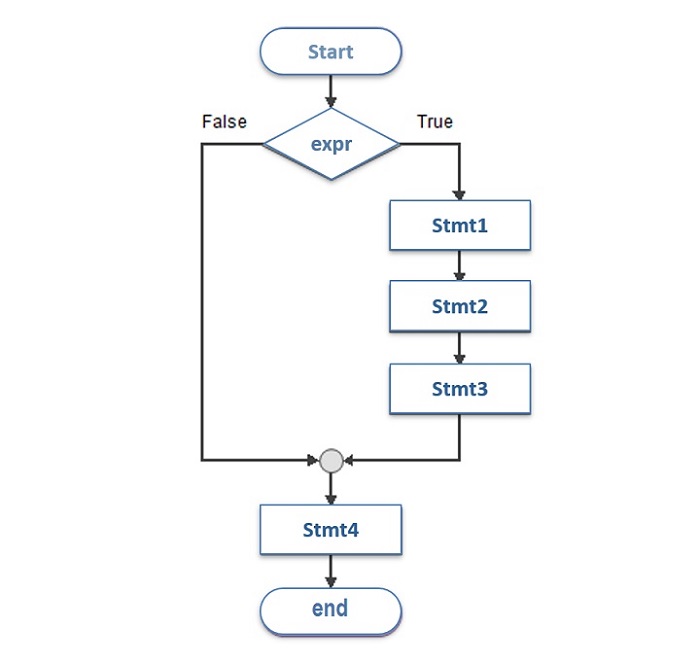
The following flowchart illustrates how Python if statement works −
Syntax
The logic in the above flowchart is expressed by the following syntax −
The if statement is similar to that of other languages. The if statement contains a boolean expression using which the data is compared and a decision is made based on the result of the comparison.
If the boolean expression evaluates to True, then the block of statement(s) inside the if statement is executed. In Python, statements in a block are uniformly indented after the ":" symbol. If boolean expression evaluates to False, then the first set of code after the end of block is executed.
Example
Let us consider an example of a customer entitiled to 10% discount if his purchase amount is >1000; if not, no discount applicable. This flowchart shows the process.
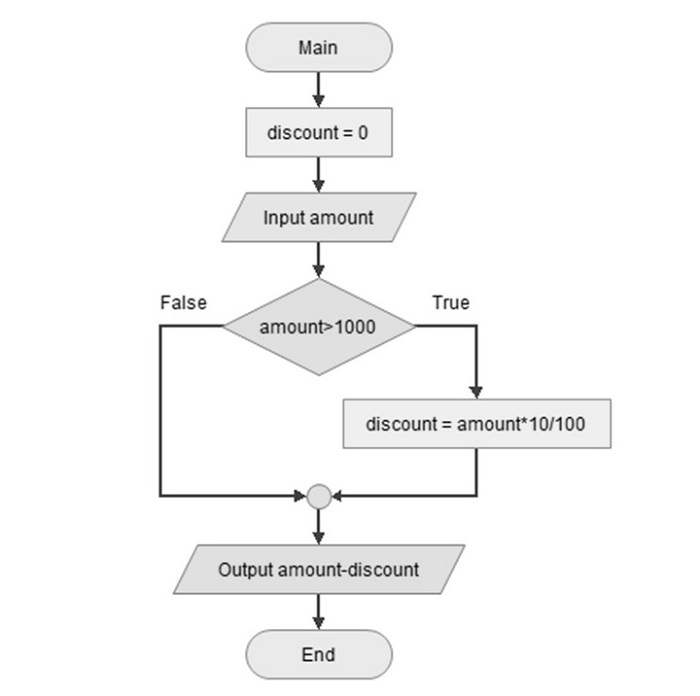
In Python, we first set a discount variable to 0 and accept the amount as input from user.
Then comes the conditional statement if amt>1000. Put : symbol that starts conditional block wherein discount applicable is calculated. Obviously, discount or not, next statement by default prints amount-discount. If applied, it will be subtracted, if not it is 0.
Here the amout is 1200, hence discount 120 is deducted. On executing the code, you will get the following output −
amount = 1080.0
Change the variable amount to 800, and run the code again. This time, no discount is applicable. And, you will get the following output −
amount = 800


The End! should you have any inquiries, we encourage you to reach out to the Vercaa Support Center without hesitation.
