In this chapter, we will study about Joomla Language Manager. The Joomla language manager option is used to set the Native Title, Language Code, SEF Prefix, and Image Prefixes of the installed or to be installed languages.
Joomla Language Manager
Following are the simple steps used to set the Joomla language manager.
Step 1 − Go to System → Global Configuration as shown in the following screen.
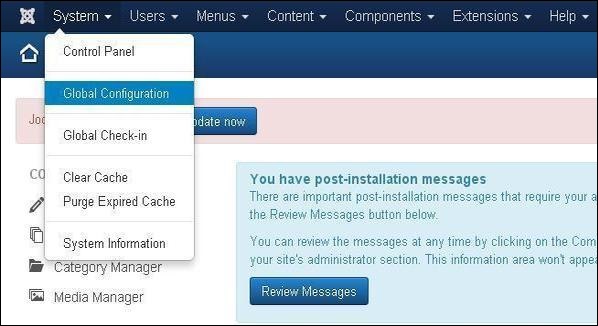
Next, click on the Language Manager in Joomla Global Configuration and you will get the screen as shown below.
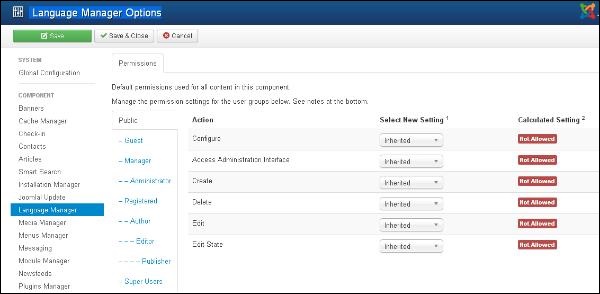
Below we have mentioned the details of the fields present in the Joomla Language Manager page.
-
Configure − Configure the installed language.
-
Access Administration Interface − Users are able to access the administration interface.
-
Create − It creates new languages in the component.
-
Delete − It deletes the created new languages in the component.
-
Edit − It edits an existing language.
-
Edit State − Changes the language state such as Publish, Unpublished, Archive and Trash in the component.
Toolbar
Following are the toolbar options in the Language Manager.
-
Save − Saves your language setting.
-
Save & Close − Saves the language setting and closes the current screen.
-
Cancel − Cancels the language setting in Joomla.
The End! should you have any inquiries, we encourage you to reach out to the Vercaa Support Center without hesitation.
