Navigating the cPanel Home Interface: Your Website Management Hub

thumb_up 1  ·  sell cPanel main dashboard, Exploring cPanel home, Website administration in cPanel

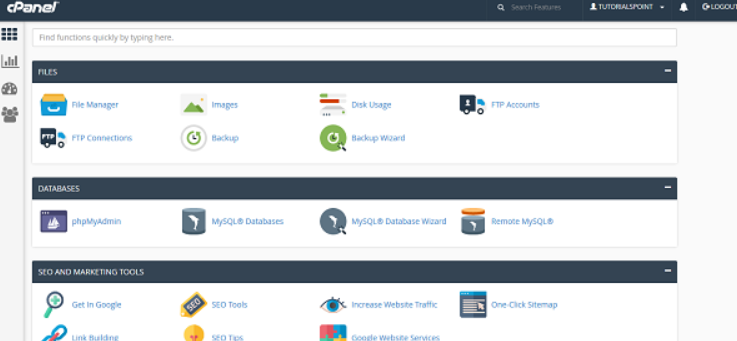
Once you are logged into cPanel dashboard, you will see that it has so many options.

In this chapter, you will find a quick brief of every option shown in the cPanel dashboard.
 

Sidebar

You can switch to your accounts’ four main areas of cPanel through this interface, which are −

  • Home − This is where you can access all the features of cPanel.

  • Statistics − Displays information about your cPanel account and also the resources it used.

  • Dashboard − Displays quick links to change styles etc. and overview of your cPanel account.

  • User manager − Here you can manage the users of your cPanel account.


Navigation Bar

On this toolbar, you will find the cPanel’s logo and a search box in which you can type any function of cPanel to access it quickly.

Like your User account name and some quick links, once you click on it. The Notification Icon will show you the recent notifications about your cPanel account.

Logout button will end your session (log you out) from the cPanel.


Feature List

It displays all the features and functions you have in your cPanel. You can click on any function and it will take you over to the desired functions interface.


The End! should you have any inquiries, we encourage you to reach out to the Vercaa Support Center without hesitation.

Was this answer helpful?

Related Articles

description

How to Transfer Your Main Domain to Another cPanel as an Add-on Domain Safely and Without Data Loss

Here, in this tutorial, we will discuss the procedure to move primary domain to a different cPanel as an add-on domain without losing data.…

arrow_forward
description

How to Modify the Admin Password in AbanteCart

AbanteCart is a free E-Commerce solution that allows user to create and manage E-commerce website. Here, in this tutorial we will discuss…

arrow_forward
description

Modifying the Admin Password in OpenCart

Here, in this tutorial we will discuss the procedure to change OpenCart Admin Password. We have shared articles related to installation of…

arrow_forward
description

How to Monitor cPanel/WHM User Activities from WHM Root?

Login to WHM with root access. Navigate to Plugins section and select ConfigServer Security & Firewall.     On the next…

arrow_forward
description

Modifying WordPress Site's CSS File via cPanel

Login to cPanel associated with your WordPress website. Go inside File Manager section and then get into WordPress installation.…

arrow_forward
arrow_back « Back