Order history is dependent on the ordered products by the user after checkout. It includes history of the product which includes order number, user name, order status etc.
You can view the order history of the product by using the following steps −
Step 1 − Go to Store and click the Orders link.
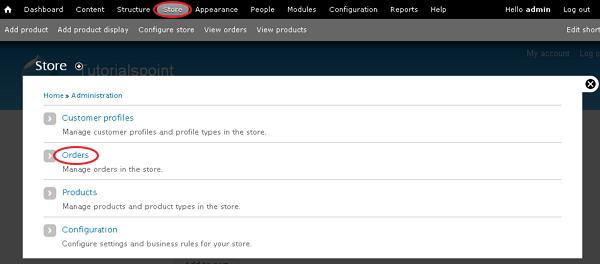
Step 2 − You will get the screen of the ordered products list.
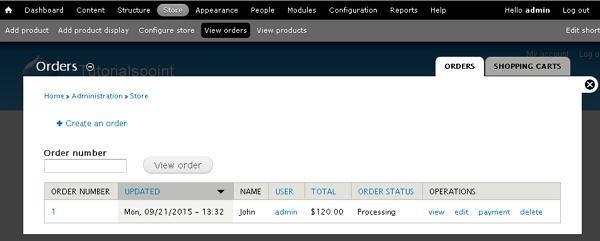
It contains fields such as −
-
Order Number − It is the order number of product.
-
Updated − It specifies when the product has been updated last.
-
Name − It is the name of the user who has ordered the product.
-
User − It is the account name of the user. It may be authenticated by user or admin.
-
Total − It specifies total amount of the ordered product.
-
Order Status − Defines the order status such as processing or pending or completed or cancelled.
-
Operations − Here you can perform some operations on the product such as −
-
View option displays the billing information and shipping information.
-
Edit option allows to edit the price, shipping information, billing information etc.
-
Delete option deletes the product order and payment option specifies paid amount for the product, date of expiry, etc..
-
The End! should you have any inquiries, we encourage you to reach out to the Vercaa Support Center without hesitation.
