In this chapter, we will study about Drupal error handling for managing error messages on Drupal site.
Error Handling is a process of detection and finding the resolutions for the errors. It can be programming application errors or communicable errors.
The following steps describe how to manage error messages in Drupa −
Step 1 − Go to Configuration and click Logging and errors.
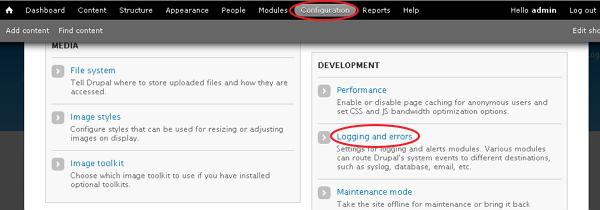
Step 2 − The Logging and errors page will get displayed as shown in the following screen.
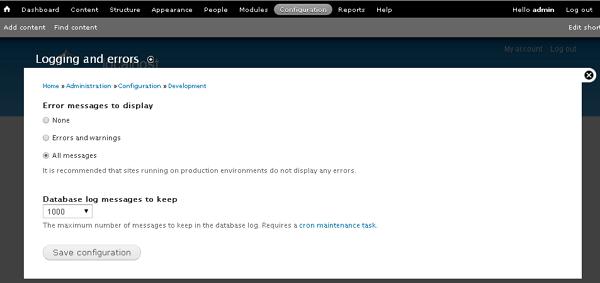
Following are the details of the fields as seen in the preceding screen −
-
Error messages to display − It specifies error messages to be displayed on the Drupal site.
-
None − This option doesn't display any error message.
-
Errors and warnings − This option displays only messages related to errors and warnings.
-
All messages − This option specifies all types of error messages such as errors, warnings, etc. to be displayed on the site.
-
-
Database log messages to keep − It indicates the maximum number of messages to be kept in the database log.
Drupal uses _drupal_exception_handler ($exception) function to handle the errors on the site. These errors will not be enclosed in a try/catch block. The script won't execute the function when an exception handler exits.
The code for _drupal_exception_handler is as follows −
function _drupal_exception_handler($exception) {
   require_once DRUPAL_ROOT . '/includes/errors.inc';
   try {
      // display the error message in the log and return the error messages to the user
      _drupal_log_error(_drupal_decode_exception($exception), TRUE);
   }
   catch (Exception $excp2) {
      // Another uncaught exception was thrown while handling the first one.
      // If we are displaying errors, then do so with no possibility of
         a further uncaught exception being thrown.

      if (error_displayable()) {
         print '<h1>Additional uncaught exception thrown while handling exception.</h1>';
         print '<h2>Original</h2> <p>'. _drupal_render_exception_safe($exception).'</p>';
         print '<h2>Additional</h2> <p>'. _drupal_render_exception_safe($excp2).'</p><hr/>';
      }
   }
}
The function must be used on every Drupal request. This function is present at the line 2328 in the file includes/bootstrap.inc.
There are two string references to _drupal_exception_handler such as_drupal_bootstrap_configuration() present in the bootstrap.inc file and_drupal_get_last_caller present in the errors.inc file. Both these files are present in the ‘includes’ folder.
The End! should you have any inquiries, we encourage you to reach out to the Vercaa Support Center without hesitation.
