In this chapter, we will study how to upgrade the Drupal site. Upgrade is a process of enhancing the old version to the latest version. Here we will upgrade the Drupal to the latest version.
Below are simple steps to upgrade the site in Drupal.
Step 1 − Backup your Drupal files. You can study about this in detail in the chapter Drupal - Site Backup.
Step 2 − If there is any upgradation to be done on Drupal site, then a message gets displayed on your site as shown in the following screen.
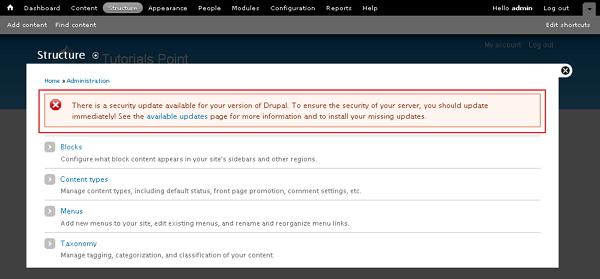
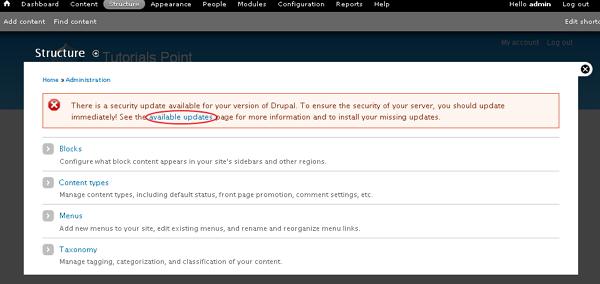
Step 3 − Click on the highlighted word available updates in the message.
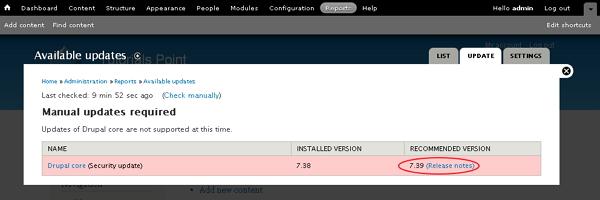
Step 4 − You can now view the Available Updates page, where it shows exactly what upgradation is to be done on the site. Here, it shows you the recommended version to update your site. Click Release notes.
Step 5 − It will take you to Drupal official site page where you can see the latest version tar.gz files available in Drupal. While writing this tutorial, the latest version was drupal - 7.39.tar.gz. Click drupal - 7.39.tar.gz.

The tar.gz files get downloaded on your system.
Step 6 − Extract the downloaded file, copy all the files and folder except the Sites folder available inside the latest downloaded folder. Later, paste these files into your existing Drupal folder.
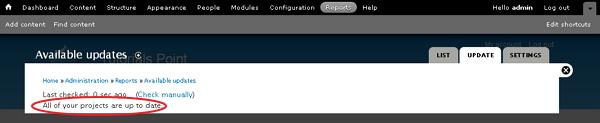
Step 7 − Go to Reports --> Available updates or else you can refresh the page; here you will view a message as shown in the following screen.
Step 8 − Click on Reports --> Status report.
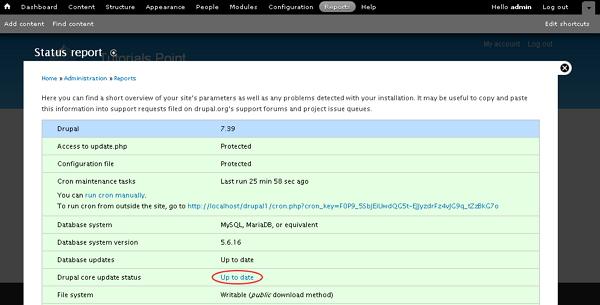
You can now see that your site is upgraded to latest version and it will show the status Up to date for Drupal core update status as shown in the preceding screen.
