In this chapter, we will study about how to Create Pages in Drupal. It is very easy to create pages in Drupal.
Following are the simple steps used to create pages in Drupal.
Step 1 − Click Content in the top menu.
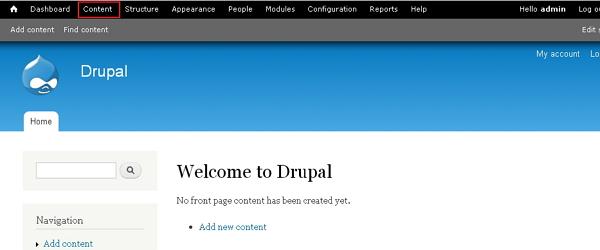
Step 2− Click on Add content as shown in the following screen.
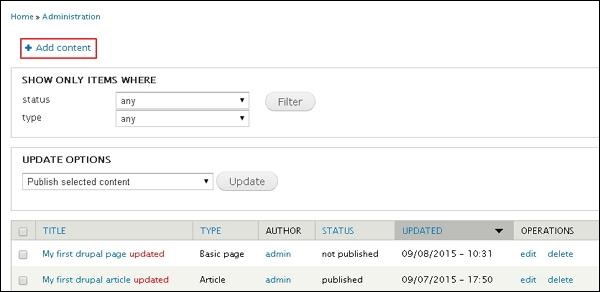
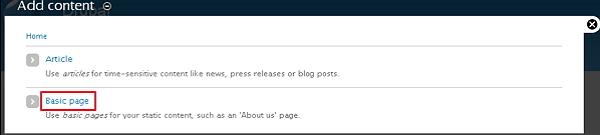
Step 3− Click the Basic page option.
Step 4− Create Basic page will get displayed where you need to fill all the required details as shown in the following screen.
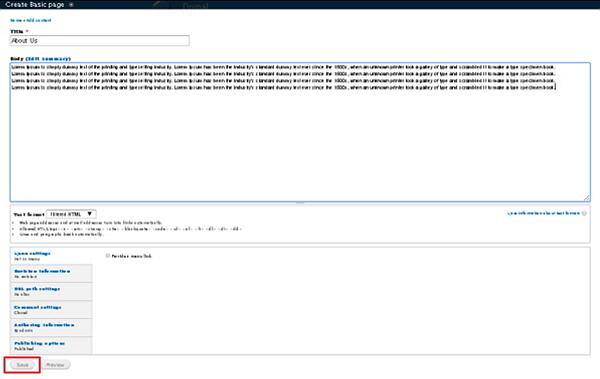
Following are the details of the fields present on Create Basic page.
-
Title − It specifies the title for new page.
-
Body − It specifies the description of the page.
-
Text format − It specifies the Text format for your page such as Filtered HTML, Full HTML, and Plain text.
-
Menu settings − By clicking on checkbox Provide a menu link, it shows the details of Menu such as Menu link title, Description, Parent item, and Weight.
-
Revision information − It specifies to provide revise information, if any changes are made in the pages.
-
URL path settings − It specifies to add URL alias to access the content of pages to the users.
-
Comment settings − By selecting open or close, it allows displaying a comment box for the page.
-
Authoring information − It specifies the authored name and the date when page has been authored.
-
Publishing options − It specifies that the page should be Published, Promoted to front page and Sticky at top of lists for the users.
Once you complete adding the content to the page. Click the Save button to create the page. Before saving the details, you can also preview the filled page using the Preview button.
The End! should you have any inquiries, we encourage you to reach out to the Vercaa Support Center without hesitation.
