In this chapter, we will study about how to create Static Pages in Drupal. Let's add some static pages named About Us and Services. The main purpuse for using a static pages is speed and steadiness. Static websites are more faster than a dynamic site.
Following are the simple steps to create static page.
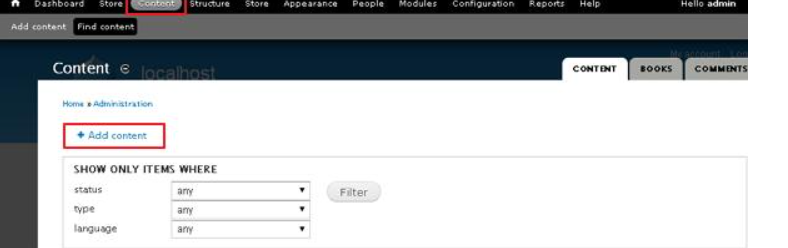
Step 1 − Click Content --> Add content link.
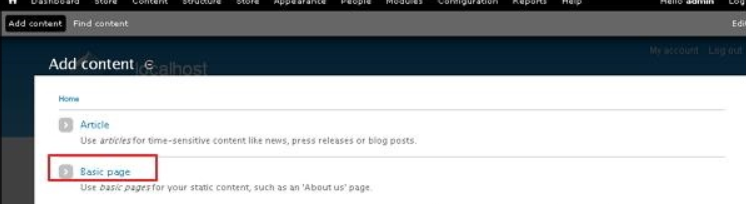
Step 2 − Click on Basic pages.
Step 3 − Create basic page will get displayed as shown in the following screen.
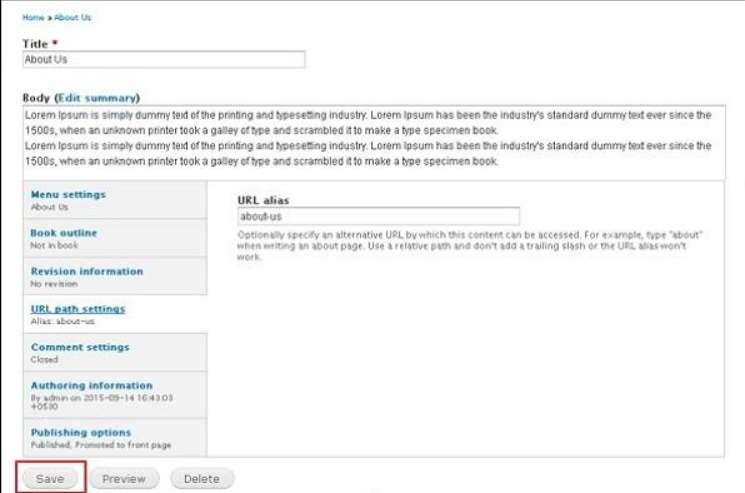
Following are the details of the fields present in the above screen.
-
Title − It specifies the title of the static page.
-
Body − It displays the body content of the page.
-
URL path settings − You can specify alternative URL by which content can be accessed.
Note − Don't add slash at the end or beginning of the URL alias or else it will not work.
You can see about-us URL path has been added under URL alias heading. The process is same for both About Us and Services static pages, only the content will be changed as per the demand.
You can click Publishing options and check the box of published option to publish your page.
Step 4 − Click on About Us tab, you will see the created about us page as shown in the following screen.
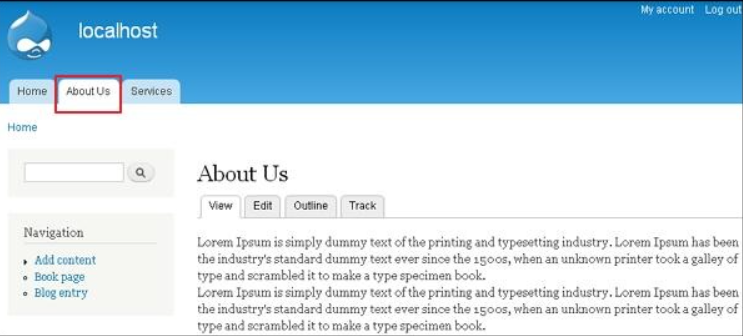
Step 5 − Click the Services tab, you will see the created services page as shown in the following screen.
The End! should you have any inquiries, we encourage you to reach out to the Vercaa Support Center without hesitation.
