Removing a Database and Database User in cPanel

thumb_up 1  ·  sell Removing, Database, Database Table Prefix, cPanel

#1. How to Delete a Database in cPanel?

  • Login to cPanel and go inside MySQL Database.
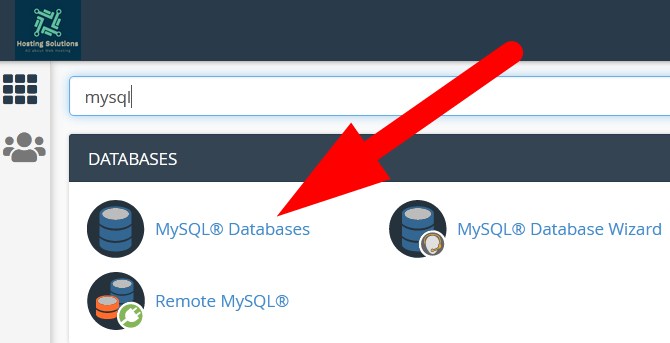
 

  • On the next page, list of all your database and database user will appear.
  • Scroll down to Current Databases  section where all the databases are listed.
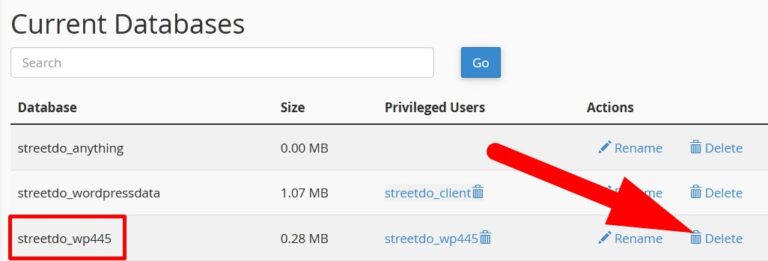


  • Click over Delete option given next to the database which you want to delete.
  • On the next page, it will ask you to confirm. Click over Delete Database.
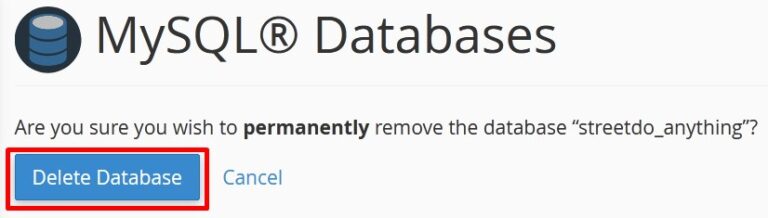
 

  • You will receive a confirmation that you have successfully deleted the database.

    #2. How to Delete a Database User in cPanel?

    • Login to cPanel and go inside MySQL Database.
    • On the next page, scroll down to Current Users section where list of all database users will be present.
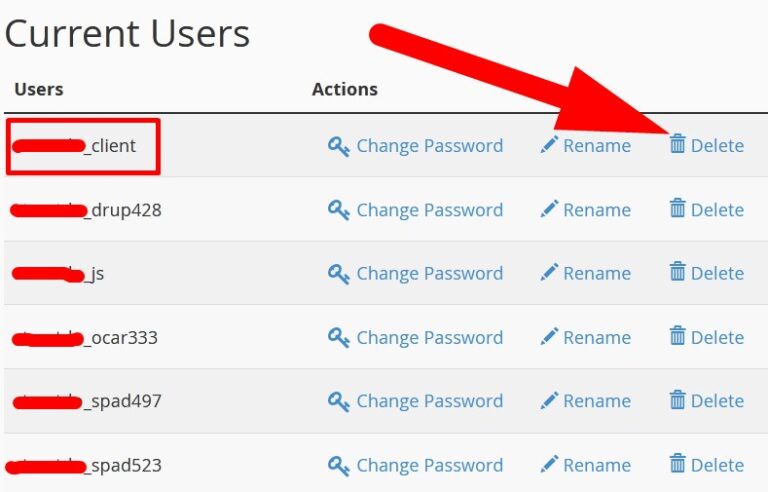
  • Move to database user which you want to delete and click over Delete option given next to the database user.
  • On the next page, it will ask you to confirm. Click over Delete User.
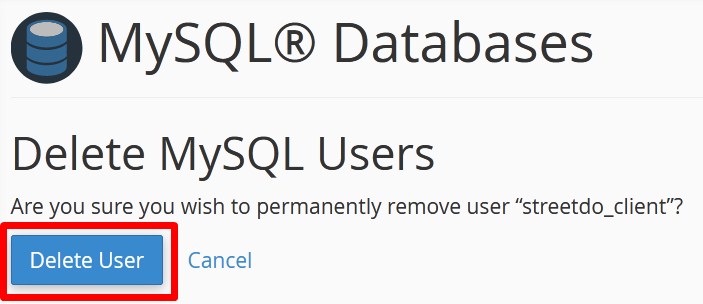


you will get a confirmation message that you have successfully deleted the particular database user in cPanel.


The End! should you have any inquiries, we encourage you to reach out to the Vercaa Support Center without hesitation.

Was this answer helpful?

Related Articles

description

How to Transfer Your Main Domain to Another cPanel as an Add-on Domain Safely and Without Data Loss

Here, in this tutorial, we will discuss the procedure to move primary domain to a different cPanel as an add-on domain without losing data.…

arrow_forward
description

How to Modify the Admin Password in AbanteCart

AbanteCart is a free E-Commerce solution that allows user to create and manage E-commerce website. Here, in this tutorial we will discuss…

arrow_forward
description

Modifying the Admin Password in OpenCart

Here, in this tutorial we will discuss the procedure to change OpenCart Admin Password. We have shared articles related to installation of…

arrow_forward
description

How to Monitor cPanel/WHM User Activities from WHM Root?

Login to WHM with root access. Navigate to Plugins section and select ConfigServer Security & Firewall.     On the next…

arrow_forward
description

Modifying WordPress Site's CSS File via cPanel

Login to cPanel associated with your WordPress website. Go inside File Manager section and then get into WordPress installation.…

arrow_forward
arrow_back « Back