#1. Types of Email Routing
cPanel provides user with multiple features that allows them to manage email related settings. Email Routing is one with which you can easily route your domain’s incoming mail. To know which type would be better to route your incoming mail, it is important to know about the feature of each.
Local Mail Exchanger: If a user select this, then all the incoming emails on the server will be received to the local mailbox, i.e, user can easily receive all its emails.
Backup Mail Exchanger: This option will save or create a backup of all the incoming emails if there is any issue in the incoming mails server. User will receive all its email when mail exchanger is aavilable.
Remote Mail Exchanger: This option is required when user uses any third party email server. To select this option, user have to update its MX record as well. For reference, you may check the articles related to
#2. How to Change Email Routing for a domain?
To change email routing of a domain on the server, follow the below mention steps.
- Login to your cPanel account.
- Navigate to EMAIL section and select Email Routing from the list.
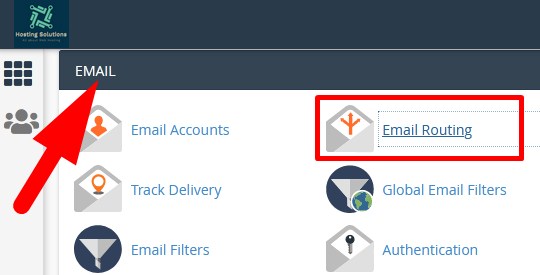
- On the next page, select Domain from the drop down. (If you have single domain then it would appear automatically)
- As you select domain, types of routing will appear.
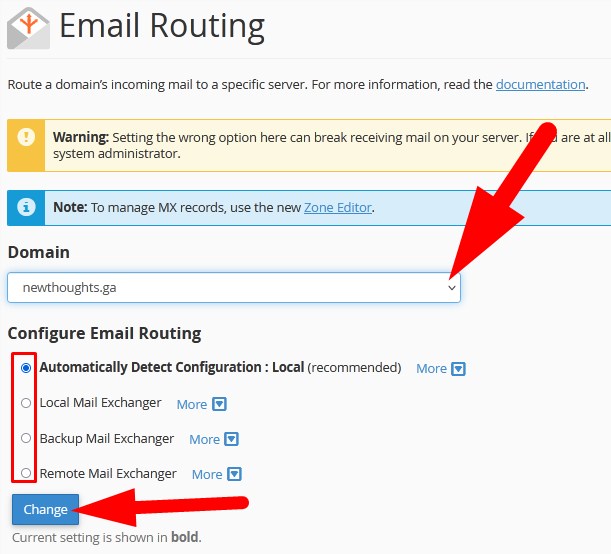
Select the one as per your requirement (it is recommended to select the first one Automatically Detect Configuration) and then click over Change
The End! should you have any inquiries, we encourage you to reach out to the Vercaa Support Center without hesitation.
